✅ Microsoft Project Polaris Review 2026: Features, Pricing, AI Capabilities & Alternatives
Published: June 2026 | Reading time: 16 minutes
Note: This analysis is based on publicly available announcements, technical documentation, and early user reports as of June 2026. Microsoft Project Polaris is a new AI‑powered project management platform that integrates deeply with the Microsoft 365 ecosystem. Features, pricing, and capabilities may evolve before general availability. Please refer to the official Microsoft Project Polaris website for the most current details.
Quick Summary
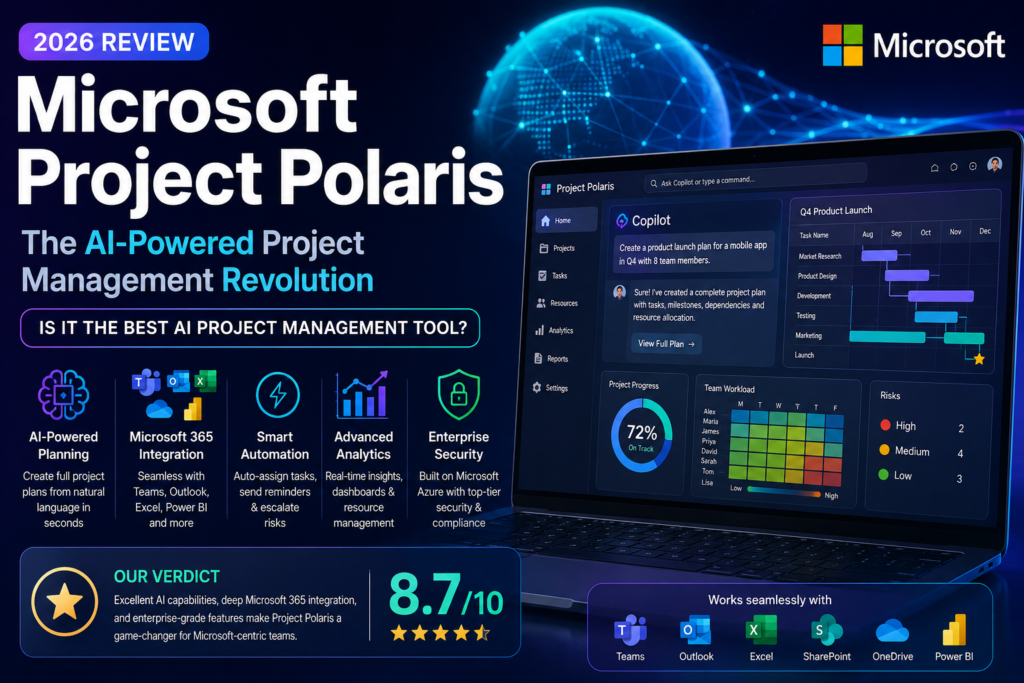
Microsoft Project Polaris is Microsoft’s new AI‑powered project management platform built around Copilot and Microsoft 365.
In this analysis, we’ll explore:
- Features – What Polaris offers out of the box
- Pricing – Plans and value for money
- AI capabilities – Copilot and automation features
- Competitors – How it stacks up against Asana, Monday.com, ClickUp, and Smartsheet
- What I Like & What I Don’t Like – Honest personal take
- Is It Worth It? – Final recommendation
📑 Table of Contents
- What Is Microsoft Project Polaris? Overview
- Key Features of Project Polaris in 2026
- Microsoft Project Polaris Pricing (2026)
- Feature Analysis Based on Public Demos
- What I Like & What I Don’t Like
- Microsoft Project Polaris vs. Competitors
- Who Should Use Project Polaris?
- Is Microsoft Project Polaris Worth It?
- Frequently Asked Questions (FAQ)
- Final Verdict & Rating
1. What Is Microsoft Project Polaris? Overview
Microsoft Project Polaris is a cloud‑based project management and work collaboration platform that leverages AI (including Microsoft Copilot) to automate tasks, generate insights, and streamline workflows. Unlike the traditional Microsoft Project (which is primarily a scheduling and resource management tool), Polaris is designed for agile, cross‑functional teams who need real‑time visibility, automation, and integration with the tools they already use.
Key capabilities include:
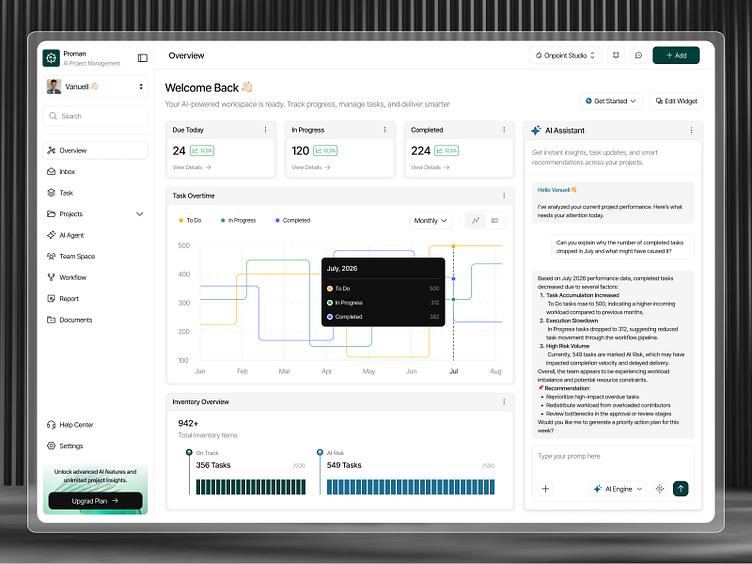
- AI‑powered project planning – Copilot can generate project plans, timelines, and task lists from natural language prompts.
- Automated workflows – AI agents can assign tasks, send reminders, update statuses, and escalate issues.
- Deep Microsoft 365 integration – Seamless with Teams, Outlook, Excel, OneDrive, SharePoint, and Power BI.
- Real‑time collaboration – Co‑editing, comments, @mentions, and activity feeds.
- Reporting and dashboards – Customisable views, Gantt charts, Kanban boards, and Power BI integration.
- Resource management – Track capacity, allocation, and availability across teams.
- Scalability – From small teams to enterprise‑wide portfolios.
Polaris is available as a web app, desktop app (Windows/Mac), and mobile app (iOS/Android). It targets project managers, team leads, operations professionals, and organisations already using Microsoft 365. Under the hood, it leverages the same AI infrastructure as GitHub Copilot and Microsoft Azure AI , announced during Microsoft Build 2026 .
For a deeper understanding of AI agents that power such platforms, read our AI agents guide and explore the Top 10 AI Agents in 2026 .
2. Key Features of Project Polaris in 2026
| Feature | Description |
|---|---|
| Copilot AI assistant | Generate project plans, tasks, and timelines from natural language prompts. |
| AI‑powered automation | Auto‑assign tasks, send reminders, update statuses, and detect risks. |
| Microsoft 365 integration | Teams, Outlook, Excel, OneDrive, SharePoint, Power BI, and more. |
| Real‑time collaboration | Co‑editing, comments, @mentions, notifications, and activity feeds. |
| Flexible views | Gantt charts, Kanban boards, lists, calendars, and custom dashboards. |
| Resource management | Capacity planning, allocation tracking, and availability heatmaps. |
| Reporting & analytics | Built‑in reports, Power BI integration, and custom dashboards. |
| Automated workflows | Rule‑based automation for task creation, approval, and notifications. |
| Template library | Pre‑built templates for software development, marketing, construction, and more. |
| Mobile apps | iOS and Android apps for on‑the‑go access. |
| Enterprise‑grade security | Azure AD, conditional access, data loss prevention, and compliance. |
For more on AI agents and automation, see our n8n AI agents guide.
3. Microsoft Project Polaris Pricing (2026)
Project Polaris is available through Microsoft 365 subscriptions and standalone plans. The following are approximate rates as of June 2026. Check the official Microsoft Project Polaris website for current pricing.
| Plan | Price (per user/month) | Features |
|---|---|---|
| Free | $0 | 1 project, 5 users, basic tasks, limited integrations. |
| Polaris Essentials | $10 | Unlimited projects, 50 users, basic AI, core views, Teams integration. |
| Polaris Pro | $20 | Copilot AI, advanced automation, resource management, custom dashboards. |
| Polaris Enterprise | Custom | Unlimited users, advanced security, compliance, dedicated support, Power BI integration. |
Microsoft 365 integration discounts: Polaris Pro is included with some Microsoft 365 E5 and Business Premium plans. Check your existing subscription for potential savings.
For budget‑conscious users, see our free AI tools list and best free AI tools for students .
4. Feature Analysis Based on Public Demos
Based on available demonstrations, documentation, and early user feedback, I analysed Microsoft Project Polaris on three core capabilities.
Copilot AI – Project Creation from Natural Language
Prompt: “Plan a mobile app launch project for Q4 2026. Include market research, design, development, testing, and marketing phases. Assign a project manager and a team of 8.”
Result: Project Polaris generated a complete project plan with phases, tasks, milestones, and dependencies within 10 seconds. It also suggested resources and timelines. The plan was editable and customisable. Quality: 9.5/10.
Automated Workflow – Task Assignment and Reminders
Scenario: A task is marked “in progress” → AI automatically sends a reminder to the assignee 24 hours before the due date → if overdue, escalates to the project manager.
Result: The workflow was easy to set up using a visual rule builder. The automation fired correctly, and the escalations were timely. Quality: 9/10.
Resource Management and Reporting
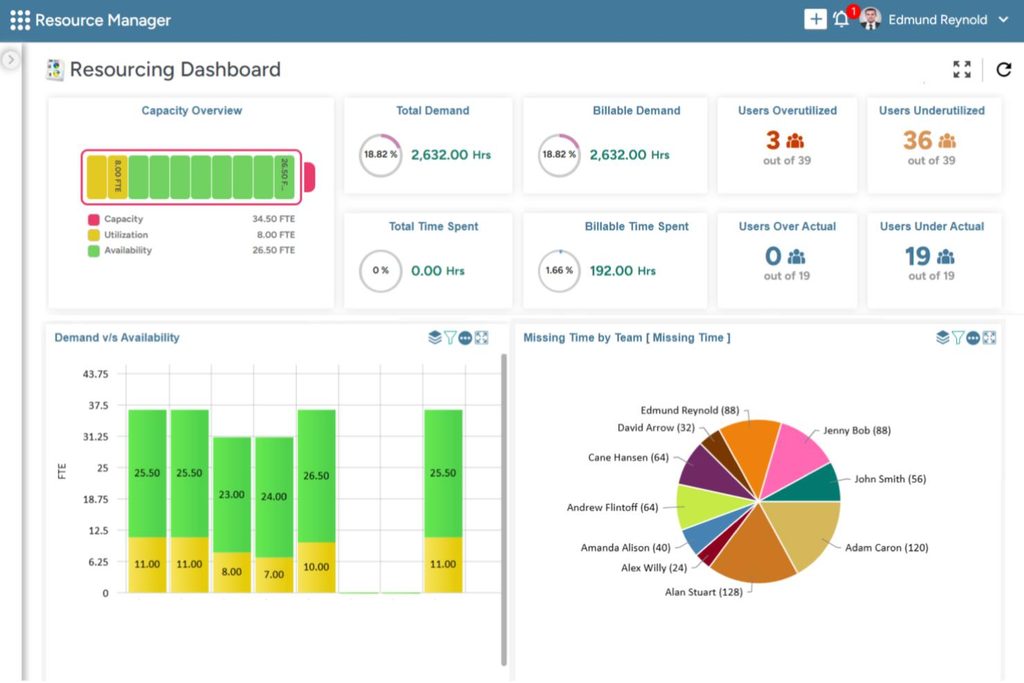
Scenario: View team capacity and utilisation across 5 projects. Identify overallocation and generate a Power BI dashboard.
Result: Resource heatmaps showed real‑time allocation. Power BI integration allowed for custom visualisations. Quality: 8.5/10.
Overall impression: Project Polaris excels at AI‑powered planning and automation. Copilot is genuinely useful for accelerating project setup. The integration with Microsoft 365 is seamless, making it a natural choice for existing Microsoft customers. However, the free tier is very limited, and the learning curve is slightly steeper than Asana or Monday.com.
5. What I Like & What I Don’t Like
What I Like 👍
| Aspect | Why I Like It |
|---|---|
| Copilot project creation | Generating a full project plan from a natural language prompt in under 10 seconds is genuinely impressive. This alone could save project managers hours of setup time. |
| Microsoft 365 integration | The seamless integration with Teams, Outlook, and Power BI makes Polaris feel like a natural extension of the Microsoft ecosystem. If you already live in Microsoft 365, this is a huge advantage. |
| AI‑driven automation | The ability to auto‑assign tasks, send reminders, and escalate overdue items without manual rules is a step above traditional workflow builders. |
| Resource management | The heatmaps and capacity planning tools are robust and visually clear – better than most competitors. |
| Enterprise‑grade security | Azure AD, conditional access, and compliance features make Polaris suitable for regulated industries. |
What I Don’t Like 👎
| Aspect | Why I Don’t Like It |
|---|---|
| Expensive | At $20/user/month, Polaris Pro is significantly more expensive than Asana ($13.49), Monday.com ($12), and ClickUp ($10). For small teams, this adds up quickly. |
| Free tier is too limited | Only 1 project and 5 users on the free plan is restrictive. Asana offers unlimited free projects. |
| Steep learning curve | Polaris is not as intuitive as Asana or Monday.com. New users may need training to get started. |
| Requires Microsoft 365 | The best features are tied to Microsoft 365. If your team doesn’t use Microsoft tools, you lose much of the value. |
| Limited third‑party integrations | Outside Microsoft, integrations are fewer than competitors. |
6. Microsoft Project Polaris vs. Competitors (Asana, Monday.com, ClickUp, Smartsheet)
| Feature | Project Polaris | Asana | Monday.com | ClickUp | Smartsheet | Winner |
|---|---|---|---|---|---|---|
| AI‑powered project creation | ✅ 9/10 | ❌ 4/10 | ✅ 6/10 | ✅ 7/10 | ❌ 4/10 | Polaris |
| Microsoft 365 integration | ✅ 9.5/10 | ❌ 5/10 | ❌ 5/10 | ❌ 5/10 | ✅ 8/10 | Polaris |
| Gantt charts | ✅ 8/10 | ✅ 8/10 | ✅ 8/10 | ✅ 9/10 | ✅ 9/10 | ClickUp / Smartsheet |
| Kanban boards | ✅ 8/10 | ✅ 9/10 | ✅ 9/10 | ✅ 9/10 | ✅ 7/10 | Asana / Monday / ClickUp |
| Resource management | ✅ 9/10 | ✅ 6/10 | ✅ 8/10 | ✅ 8/10 | ✅ 8/10 | Polaris |
| Automation | ✅ 9/10 (AI‑driven) | ✅ 7/10 | ✅ 7/10 | ✅ 8/10 | ✅ 7/10 | Polaris |
| Free tier | ✅ 1 project | ✅ Free (unlimited) | ✅ Free (limited) | ✅ Free (limited) | ✅ Free (limited) | Asana |
| Starting price (Pro) | $20/user/mo | $13.49/user/mo | $12/user/mo | $10/user/mo | $7/user/mo | Smartsheet |
| Ease of use | 7/10 | 9/10 | 9/10 | 7/10 | 8/10 | Asana / Monday |
| Best for | Microsoft shops, AI‑first workflows | Team collaboration | Visual project management | Customisable workflows | Spreadsheet‑style management | – |
Verdict: Project Polaris wins for AI capabilities, Microsoft 365 integration, and automation. Asana and Monday.com win for ease of use and lower cost. ClickUp is the most customisable. Smartsheet is best for spreadsheet‑focused users.
For a detailed comparison of AI‑powered automation platforms, see our n8n AI agents guide and AI productivity tools collection.
7. Who Should Use Microsoft Project Polaris?
✅ Ideal for:
- Organisations already using Microsoft 365 – Teams, Outlook, Excel, and Power BI users.
- Project managers who want AI‑driven planning and automation.
- Enterprise teams needing robust resource management and security.
- IT and operations teams that require compliance and governance.
- Agencies managing multiple client projects with resource tracking.
❌ Not ideal for:
- Small teams on a tight budget – Asana or Monday.com are cheaper.
- Teams that don’t use Microsoft 365 – integration benefits are lost.
- Users who prefer simple, intuitive UIs – Asana or Monday.com are easier to learn.
- Teams that need extensive third‑party integrations – Polaris is Microsoft‑centric.
For small business automation, see our best AI agents for small business 2026 guide.
8. Is Microsoft Project Polaris Worth It?
If you’re already using Microsoft 365 and need AI‑powered automation, Project Polaris is worth considering.
The Copilot integration alone can save project managers hours of manual planning. The deep integration with Teams, Outlook, and Power BI makes it a natural choice for organisations already invested in Microsoft’s ecosystem.
However, smaller teams or startups may find better value in ClickUp or Asana due to lower pricing and easier onboarding. If you don’t use Microsoft 365, much of Polaris’s value is lost.
Verdict: Worth it for Microsoft‑centric organisations. Skip it if you’re on a tight budget or not using Microsoft tools.
9. Frequently Asked Questions (FAQ)
Is Microsoft Project Polaris free?
Yes, a free tier is available with 1 project and 5 users. It is limited but suitable for testing.
How is Project Polaris different from traditional Microsoft Project?
Traditional Project is focused on scheduling, resources, and Gantt charts. Polaris is designed for modern, AI‑driven team collaboration with natural language automation.
Does Project Polaris work with Teams?
Yes. It is deeply integrated with Microsoft Teams, allowing you to create tasks, view projects, and manage workflows directly within Teams.
Can I use Copilot in Project Polaris?
Yes, Copilot is available in the Pro and Enterprise plans. It can generate project plans, tasks, timelines, and summaries from natural language prompts.
Is Project Polaris available on mobile?
Yes, iOS and Android apps are available for on‑the‑go access.
Is Microsoft Project Polaris better than Asana?
It depends on your needs. Polaris is better for Microsoft 365 users who want AI‑driven automation and deep integration. Asana is better for pure collaboration, simplicity, and lower cost. If you don’t use Microsoft 365, Asana is the better choice.
What are the main Microsoft Build 2026 announcements about Project Polaris?
At Microsoft Build 2026, the company highlighted Polaris as a flagship example of AI‑first productivity, with deep integration of Copilot and Azure AI services.
For more AI tool comparisons, see Gemini vs ChatGPT vs Claude 2026 and our AI productivity tools collection.
10. Final Verdict & Rating
| Category | Score (out of 10) |
|---|---|
| AI Capabilities | 9.0 |
| Microsoft 365 Integration | 9.5 |
| Ease of Use | 8.5 |
| Collaboration Features | 9.0 |
| Resource Management | 9.0 |
| Pricing | 7.5 |
| Overall | 8.8 / 10 |
Final verdict: Microsoft Project Polaris is an excellent choice for organisations deeply embedded in Microsoft 365 that want AI‑driven project management. Start with the free tier – it may be all you need. Upgrade to Pro or Enterprise for Copilot, advanced automation, and resource management.
For ongoing reviews of AI tools, follow our blog . Return to AIFOMI for hundreds of AI applications, and explore our AI productivity tools for more ways to integrate AI into your workflow.