n8n AI Agents: The Ultimate Guide to Intelligent Workflow Automation in 2026
Published: June 2026 | Reading time: 18 minutes
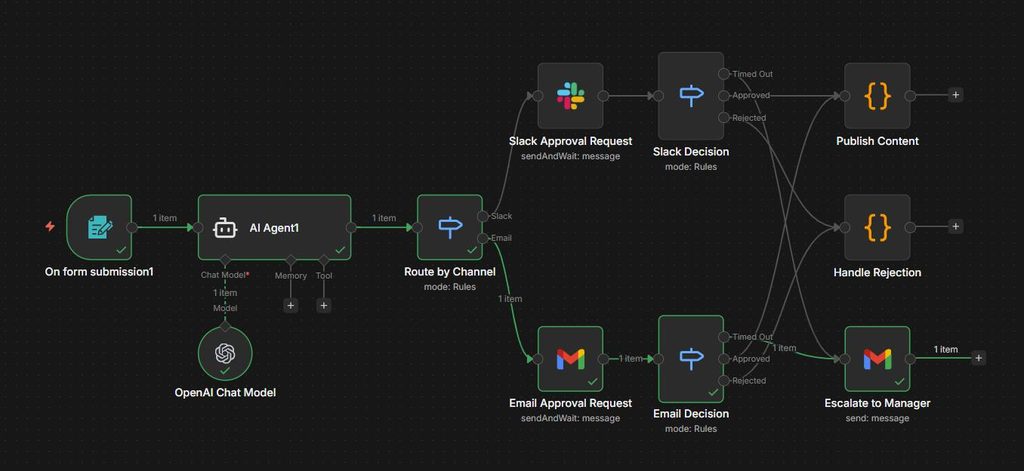
In the world of workflow automation, n8n has emerged as one of the most powerful open‑source platforms. But with the rise of agentic AI, n8n now allows you to integrate AI agents directly into your workflows. This means you can build systems that plan, execute decisions, use external tools, and adapt dynamically—without writing complex code.
In this comprehensive guide, you will learn what n8n AI agents are, how to set them up, real‑world examples, pricing, and how n8n compares to other automation tools. By the end, you will be able to build your own intelligent agents that can automate tasks far beyond simple “if‑this‑then‑that” rules. best-ai-workflow-automation
If you are new to AI agents, we recommend reading our introductory guide first.
👉 https://aifomi.com/ai-agents/
For a complete overview of all AI tools, visit our Best AI Tools directory.
👉 https://aifomi.com/best-ai-tools/
📑 Table of Contents (Clickable via Easy Table of Contents plugin)
- What is n8n? Overview
- What are AI Agents in n8n?
- Key Benefits of Using AI Agents in n8n
- Types of AI Agents Available in n8n (2026)
- How to Set Up an AI Agent in n8n (Step‑by‑Step)
- Real‑World Examples of n8n AI Agents
- n8n vs Zapier vs Make: Smart Agent Comparison
- Best AI Models to Integrate with n8n
- Pricing: How Much Does n8n with AI Agents Cost?
- Challenges and Limitations
- Frequently Asked Questions
- Conclusion & Recommendations
- Additional Internal Links from AIFOMI
1. What is n8n? Overview
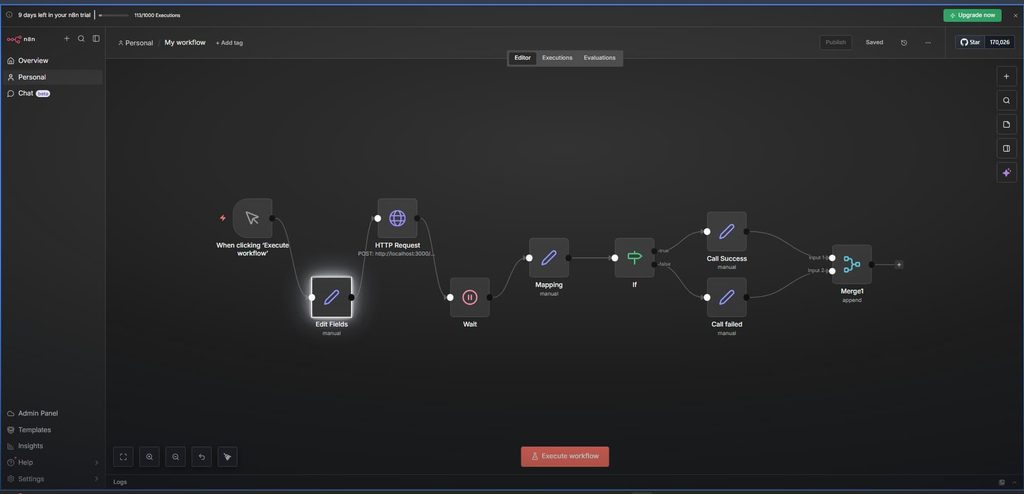
n8n (pronounced “n-eight-n”) is an open‑source workflow automation platform that connects various applications and services using a visual interface. Similar to Zapier or Make, n8n allows you to create automation workflows (called “workflows”) by dragging and dropping nodes. Each node represents an action, such as “send email,” “read Google Sheet,” or “call API.”
What sets n8n apart is that it is open‑source and can be self‑hosted, giving you full control over your data and no vendor lock‑in. In 2026, n8n introduced advanced AI agent nodes, enabling workflows to make intelligent decisions, plan multi‑step tasks, and use external tools autonomously.
For a broader look at automation and AI tools, explore our Best AI Tools directory.
👉 https://aifomi.com/best-ai-tools/
2. What are AI Agents in n8n?
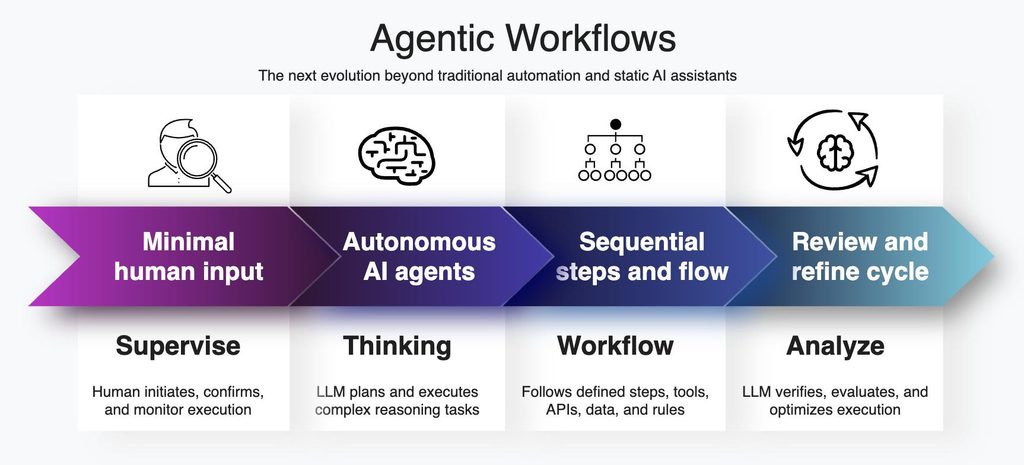
AI agents in n8n are specialized nodes that bring large language model (LLM) capabilities directly into your workflows. Unlike regular nodes that execute a fixed action, an AI agent node can:
- Receive a goal (e.g., “analyze this PDF and email a summary”)
- Plan a sequence of actions to achieve that goal
- Execute those actions by calling other nodes (tools) such as email, database, HTTP requests
- Decide dynamically based on intermediate results
- Remember context across multiple interactions (memory)
In essence, an n8n AI agent acts as a digital employee inside your automation system. You give it a high‑level instruction, and it figures out the steps.
For a deeper understanding of AI agents in general, read our full guide.
👉 https://aifomi.com/ai-agents/
3. Key Benefits of Using AI Agents in n8n
| Benefit | Description |
|---|---|
| Dynamic decision‑making | No need to hardcode every possible branch; the agent decides the path based on data. |
| Tool use | The agent can call external tools (email, calendar, search, APIs) as needed. |
| Natural language interaction | You can instruct the agent using plain English, e.g., “Schedule a team meeting tomorrow at 3 PM.” |
| Context memory | The agent remembers previous interactions within the same workflow run. |
| Scalability | Run hundreds of parallel agents to process large workloads. |
| Privacy & control | Because n8n is open‑source, you can self‑host everything and keep your data on your own servers. |
For those who value privacy, self‑hosting AI agents is a game‑changer. You might also be interested in open‑source LLMs like Llama 4 or MiniMax M2.7.
👉 https://aifomi.com/minimax-m2-7-ai-model/
4. Types of AI Agents Available in n8n (2026)
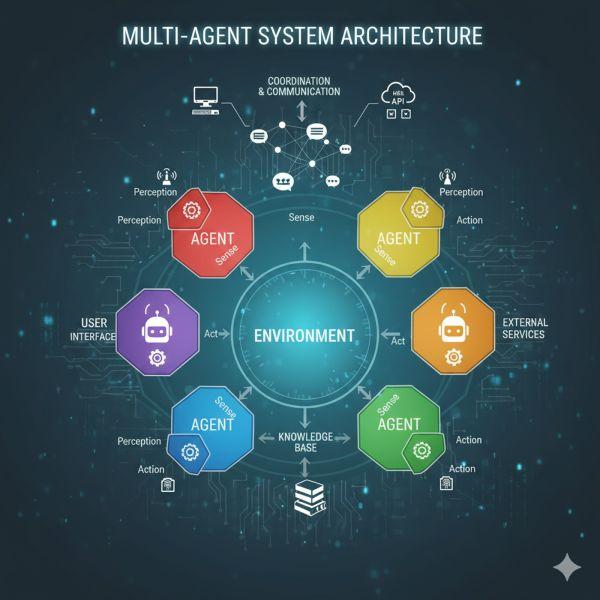
n8n currently offers four types of AI agent nodes, each suited for different use cases:
A. Conversational Agent
- Purpose: Chat with users in natural language.
- Capabilities: Answer questions, provide recommendations, execute simple commands.
- Example: A customer support agent that answers FAQs and escalates complex issues.
B. Task Agent
- Purpose: Achieve a specific, well‑defined goal.
- Capabilities: Plan and execute multi‑step actions without human intervention.
- Example: Extract data from an invoice PDF and update a database.
C. Tool‑Using Agent
- Purpose: Interact with external tools and APIs.
- Capabilities: Decide which tool to call and when, based on context.
- Example: Monitor stock prices and send an email alert when a threshold is crossed.
D. Planning Agent
- Purpose: Handle complex, long‑running objectives.
- Capabilities: Break a large goal into sub‑tasks, coordinate execution, and adapt plans.
- Example: Plan a business trip (flights, hotel, meetings, restaurants) within a budget.
For more advanced agentic workflows, see our analysis of Google I/O 2026.
👉 https://aifomi.com/google-io-2026-agentic-ai/
5. How to Set Up an AI Agent in n8n (Step‑by‑Step)
This guide assumes you have access to an n8n instance (self‑hosted or cloud). Follow these steps to build your first AI agent.
Step 1: Create a new workflow
- Log in to n8n and click New Workflow.
Step 2: Add an AI Agent node
- Search for “AI Agent” in the node palette and drag it onto the canvas.
Step 3: Choose agent type
- Select from Conversational, Task, Tool‑Using, or Planning.
Step 4: Add an LLM node
- You need a large language model to power the agent. n8n provides dedicated nodes for OpenAI, Anthropic, Google Gemini, and local models via Ollama.
- Example: Add an OpenAI node, enter your API key, and choose a model (e.g., GPT‑5.5 or Gemini 3.5 Flash).
For hardware requirements if you run local models, check our guide.
👉 https://aifomi.com/gemini-intelligence-hardware-requirements-a-complete-20/
Step 5: Define tools (optional)
- If you are using a Tool‑Using Agent, add the tools it is allowed to use. Tools can be any n8n node: email, HTTP request, Google Sheets, etc.
- Connect the agent to those tool nodes.
Step 6: Write the system prompt (instructions)
- The system prompt tells the agent what its role is and how to behave.
- Example: “You are a customer support agent for an online store. Answer questions about orders, returns, and shipping. If you don’t know the answer, say so and escalate to human support.”
Step 7: Connect input and test
- Connect a trigger node (e.g., Webhook, Form, or Schedule) to the agent.
- Click Execute Workflow and test with a sample input.
Step 8: Deploy
- Once testing is successful, activate the workflow. It will run automatically based on the trigger (e.g., every hour or on webhook call).
For AI coding assistance while building custom nodes, see our list of best AI coding assistants.
👉 https://aifomi.com/best-ai-coding-assistants/

6. Real‑World Examples of n8n AI Agents
Example 1: Financial Document Processor
- Trigger: New PDF invoice uploaded to a cloud folder (e.g., Dropbox).
- Agent (Tool‑Using): Extracts invoice number, date, amount, and vendor using a vision‑enabled LLM (like Gemini 3.5 Pro or GPT‑5.5 with image input).
- Actions: Writes the data into Google Sheets, then sends a Slack notification to the finance team.
- Outcome: Manual data entry reduced to zero.
Example 2: Intelligent Email Support
- Trigger: New email arrives at [email protected].
- Agent (Conversational): Reads the email, categorises the issue (billing, technical, general question), and drafts a reply. If the issue is complex, it creates a ticket in Jira.
- Outcome: Faster response times and reduced human workload.
Example 3: Automated Research & Summarisation
- Trigger: A user sends a message via a chat widget: “Summarise today’s top AI news.”
- Agent (Task + Tool‑Using): Uses a web search tool to find the top 5 articles, then summarises each into three bullet points, and compiles a final report.
- Outcome: Instant, concise news briefings.
Example 4: Calendar & Meeting Scheduler
- Trigger: User command: “Schedule a one‑hour design review with Sarah and Tom next Wednesday at 2 PM.”
- Agent (Planning): Checks Google Calendar availability for all participants, finds a free slot, sends invites, and confirms via email.
- Outcome: No more back‑and‑forth emails.
For AI video generation, you could extend these agents to create video summaries. See our Google Veo 3.1 review.
👉 https://aifomi.com/google-veo-3-1-ai-video-model/
7. n8n vs Zapier vs Make: Smart Agent Comparison
| Feature | n8n | Zapier | Make (Integromat) |
|---|---|---|---|
| Native AI Agent nodes | ✅ Yes (Conversational, Task, Tool‑Using, Planning) | ❌ Limited (requires external AI steps) | ❌ Limited (requires custom API calls) |
| Open‑source & self‑hostable | ✅ Yes | ❌ No | ❌ No |
| Pricing for self‑hosted | Free (pay only for your server) | Not available | Not available |
| Support for local LLMs (Llama, Mistral) | ✅ Yes (via Ollama node) | ❌ No | ❌ No |
| Ease of visual workflow builder | Good | Excellent | Excellent |
| Number of native integrations | 400+ | 5000+ | 1500+ |
| Free tier (cloud) | Yes (limited executions) | Yes | Yes |
Verdict: If you need maximum privacy, flexibility, and advanced AI agent capabilities, n8n is the clear winner. If you need the largest library of pre‑built app integrations, Zapier may still be useful.
For more on free automation tools, visit:
👉 https://aifomi.com/free-ai-tools/

8. Best AI Models to Integrate with n8n
You can connect n8n to any LLM via its API. Here are the top choices in 2026:
| Model | Strengths | Integration in n8n |
|---|---|---|
| GPT‑5.5 (OpenAI) | High general intelligence, built‑in tools | Dedicated OpenAI node |
| Gemini 3.5 Pro / Flash | 1M context window, low cost (Flash) | HTTP Request node (or community node) |
| Claude Opus 4.7 | Best for coding, reliable prose | Dedicated Anthropic node |
| Llama 4 (Meta) | Open‑source, fully private | Ollama node (self‑hosted) |
| MiniMax M2.7 | Very cheap, good performance | HTTP Request node |
For a direct comparison of Gemini vs ChatGPT vs Claude, see our dedicated article.
👉 https://aifomi.com/chatgpt-vs-gemini/
To understand the cost‑effective MiniMax model:
👉 https://aifomi.com/minimax-m2-7-ai-model/
9. Pricing: How Much Does n8n with AI Agents Cost?
n8n Pricing (without AI)
- Self‑hosted: Free (you pay only for your own server – VPS starting at ~$5/month).
- n8n Cloud (managed): Starts at €20/month for 2,500 workflow executions.
- Enterprise: Custom pricing.
AI Model Costs (per 1M tokens, June 2026)
| Model | Input price | Output price |
|---|---|---|
| Gemini 3.5 Flash | $1.50 | $9.00 |
| GPT‑5.5 | $5.00 | $30.00 |
| Claude Opus 4.7 | $5.00 | $25.00 |
| Llama 4 (self‑hosted) | Electricity + hardware | – |
Tip: To minimise costs, start with Gemini 3.5 Flash or self‑host an open‑source model like Llama 4.
For more free AI resources, check:
👉 https://aifomi.com/free-ai-tools/
10. Challenges and Limitations
Despite its power, n8n AI agents have some challenges:
- Learning curve: Building complex agents requires understanding of workflow design, prompt engineering, and possibly API integrations.
- Token consumption: Multi‑step planning can consume thousands of tokens per task, increasing costs if you use paid models.
- Latency: Calling external LLMs adds seconds of delay; not ideal for real‑time interactive applications.
- Security: When self‑hosting, you must secure your server and API keys properly.
For a broader discussion of AI agent challenges, see our main AI Agents article.
👉 https://aifomi.com/ai-agents/
11. Frequently Asked Questions (FAQs)
Q1: Is n8n completely free?
A: Yes, if you self‑host it. The cloud version has a free tier with limited executions.
Q2: Can I use local LLMs (like Llama 4) with n8n?
A: Absolutely. Use the “Ollama” node to connect to local models running on your own hardware.
Q3: Which AI model is best for n8n agents?
A: For low cost and large context: Gemini 3.5 Flash. For best coding ability: Claude Opus 4.7. For all‑round performance: GPT‑5.5.
Q4: How do I make my agent remember previous messages?
A: In the AI Agent node, enable the “Memory” option (e.g., window buffer or conversation buffer).
Q5: What’s the difference between n8n AI agents and OpenAI’s Assistant API?
A: n8n agents are more flexible because they can use any node as a tool, not just predefined functions. You also get visual workflow orchestration.
Q6: Does n8n support image input for vision tasks?
A: Yes, if you use an LLM node that accepts images (e.g., GPT‑5.5 or Gemini via HTTP Request) and configure the agent accordingly.
For creative AI tasks like image generation, you might also like Midjourney V7.
👉 https://aifomi.com/midjourney-v7-review/
12. Conclusion & Recommendations
n8n AI agents represent a major leap forward in workflow automation. By combining an open‑source, self‑hostable platform with powerful agentic capabilities, n8n gives you unprecedented control over your data and automation logic.
Final recommendations:
- Start with the self‑hosted version to explore all features for free.
- Use Gemini 3.5 Flash or a local Llama 4 model to keep costs low.
- Begin with a simple Task Agent (e.g., email summariser) before moving to complex planning agents.
- Take advantage of n8n’s active community and pre‑built workflow templates.
If you are still evaluating options, compare n8n with other AI tools in our directory.
👉 https://aifomi.com/best-ai-tools/
For ongoing news and tutorials, bookmark our blog.
👉 https://aifomi.com/ai-tools-blog/
Are n8n AI Agents suitable for beginners?
Yes, n8n AI Agents can be used by beginners thanks to the visual workflow builder and extensive documentation.
What can n8n AI Agents automate?
n8n AI Agents can automate emails, research, customer support, scheduling, document processing, and many other business workflows.
Whether you are a developer, marketer, or business owner, n8n AI Agents provide one of the most powerful ways to build intelligent workflow automation in 2026.https://blog.n8n.io/ai-agents/?utm_source=chatgpt.comhttps://blog.n8n.io/ai-a