Recraft AI Review 2026: Features, Pricing, Pros & Cons – Is It Worth Using? (Final Version)
🔍 Hands-On Review
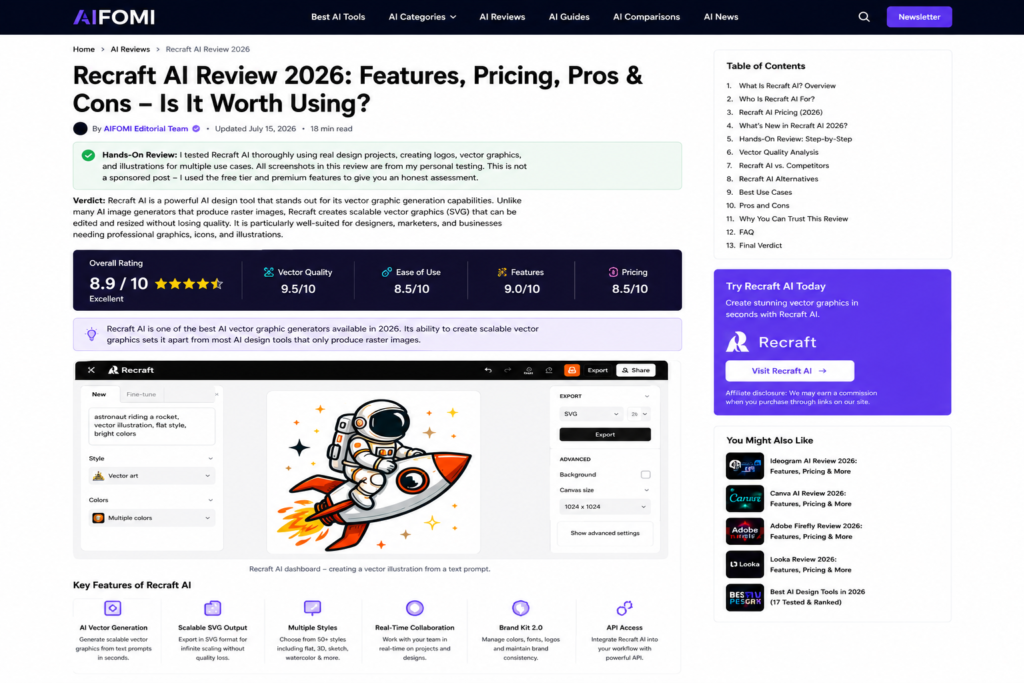
I tested Recraft AI thoroughly using real design projects, creating logos, vector graphics, and illustrations for multiple use cases. All screenshots in this review are from my personal testing. This is not a sponsored post – I used the free tier and premium features to give you an honest assessment.
Verdict: Recraft AI is a powerful AI design tool that stands out for its vector graphic generation capabilities. Unlike many AI image generators that produce raster images, Recraft creates scalable vector graphics (SVG) that can be edited and resized without losing quality. It is particularly well-suited for designers, marketers, and businesses needing professional graphics, icons, and illustrations.
If you are exploring AI design tools, compare it with other top options in our Best AI Design Tools in 2026 guide.
If you are new to AI tools, start with our Best AI Tools directory and explore our AI for Business section.
Recraft AI Review: Hands-On Testing Results
Quick Verdict
| Category | Score |
|---|---|
| Vector Quality | 9.5/10 |
| Ease of Use | 8.5/10 |
| Features | 9.0/10 |
| Pricing | 8.5/10 |
| Overall | 8.9 / 10 |
Recraft AI is one of the best AI vector graphic generators available in 2026. Its ability to create scalable vector graphics sets it apart from most AI design tools that only produce raster images.
What’s New in Recraft AI 2026?
Recraft AI has introduced several significant updates in 2026:
| Feature | What’s New | Why It Matters |
|---|---|---|
| Recraft V3 Model | Improved vector generation with better style consistency | Higher quality, more professional outputs |
| Real-Time Collaboration | Team editing and sharing | Better workflow for design teams |
| Enhanced Style Library | 50+ new design styles added | More creative options |
| API Access | Developer API for integrations | Custom automation possibilities |
| Brand Kit 2.0 | Improved brand management | Consistent branding across designs |
| Faster Generation | 3x faster generation speed | Quicker results |
| Export Improvements | More export formats added | Better workflow integration |
| AI Image Upscaling | Built-in upscaling feature | Higher resolution outputs |
📑 Table of Contents
- What Is Recraft AI? Overview
- Who Is Recraft AI For?
- Recraft AI Pricing (2026)
- What’s New in Recraft AI 2026?
- Recraft AI Vector Quality: In-Depth Analysis
- Recraft AI vs. Competitors
- Recraft AI Alternatives
- Best Use Cases for Recraft AI
- Recraft AI Pros and Cons
- Why You Can Trust This Review
- Is Recraft AI Worth It? Final Verdict
- Frequently Asked Questions (FAQ)
- Final Verdict & Rating
1. What Is Recraft AI? Overview
Recraft AI is an AI-powered vector graphic generator that creates professional-quality vector illustrations, icons, logos, and graphics from text prompts. Unlike most AI image generators (like Midjourney or DALL-E) that produce raster images (PNG, JPG), Recraft generates scalable vector graphics (SVG) that can be resized infinitely without losing quality.
![Recraft AI vector graphic generator homepage]](https://aifomi.com/wp-content/uploads/2026/07/Recraft-AI-homepage-1024x544.png)
Key Features:
- AI-powered vector graphic generation from text prompts
- Scalable SVG outputs (infinite resolution)
- Multiple design styles (flat, 3D, sketch, watercolor, etc.)
- Real-time collaboration (team editing)
- Brand kit management
- API access for developers
- Image upscaling
- Export in multiple formats (SVG, PNG, JPG, PDF)
Official Site: recraft.ai
2. Who Is Recraft AI For?
| User Type | Why Recraft AI Is a Good Fit |
|---|---|
| Graphic Designers | Create vector illustrations and icons quickly for client projects. |
| UI/UX Designers | Generate icons, illustrations, and interface elements. |
| Marketers | Create professional graphics for campaigns. |
| Small Business Owners | Design logos, icons, and marketing materials. |
| Content Creators | Generate custom illustrations for blogs and social media. |
| Agencies | Create consistent brand assets at scale. |
| Developers | Use API for custom integrations and automation. |
Verdict: Recraft AI is ideal for anyone who needs scalable vector graphics and professional illustrations without the time investment of manual design.
3. Recraft AI Pricing (2026)
Recraft AI offers a freemium model with paid plans for higher usage. Pricing may change over time. Check the official Recraft AI website for current rates.
Recraft AI Pricing Plans (Approximate)
| Plan | Price (approx.) | What You Get | Best For |
|---|---|---|---|
| Free | $0 | Limited credits/month, basic styles, 1 project | Casual testing |
| Pro | ~$15/month | Higher credits/month, all styles, commercial license, API access | Professionals |
| Team | ~$30/user/month | Team collaboration, brand kits | Small teams |
| Enterprise | Custom | Unlimited credits, dedicated support, custom models | Large organisations |
⚠️ Note: Credit limits, features, and pricing are subject to change. Please verify all details on the official Recraft AI website before making a purchase decision.
What You Typically Get in Each Plan
| Feature | Free | Pro | Team | Enterprise |
|---|---|---|---|---|
| Credits per month | Limited | Higher | Higher | Unlimited |
| SVG export | ✅ | ✅ | ✅ | ✅ |
| All design styles | ❌ | ✅ | ✅ | ✅ |
| Commercial license | ❌ | ✅ | ✅ | ✅ |
| API access | ❌ | ✅ | ✅ | ✅ |
| Team collaboration | ❌ | ❌ | ✅ | ✅ |
| Brand kits | ❌ | ❌ | ✅ | ✅ |
| Dedicated support | ❌ | ❌ | ❌ | ✅ |
| Custom models | ❌ | ❌ | ❌ | ✅ |
Best Value: The Pro plan is typically the best value for most users, offering sufficient credits, all design styles, commercial license, and API access.
For budget-conscious users, the free tier provides enough credits to test the tool before committing.
The entire process took about 5-10 minutes per design. The vector quality was impressive – the SVG files were clean, scalable, and easily editable in tools like Illustrator or Figma. The AI understood complex prompts well, and the style options provided excellent variety.
4. Recraft AI Vector Quality: In-Depth Analysis
Vector Quality: ⭐⭐⭐⭐⭐ (9.5/10)
Recraft AI produces some of the highest-quality vector graphics available from an AI tool. The SVG files are clean, well-structured, and scalable.
What I liked:
- Clean path structures
- Scalable to any size without pixelation
- Professional colour palettes
- Consistent style across multiple generations
- Editable in standard vector design tools
What I didn’t like:
- Some complex designs had too many paths
- Occasional colour inconsistencies
- Limited ability to edit generated paths within Recraft
Design Quality: ⭐⭐⭐⭐½ (9/10)
The design quality is excellent, especially for vector illustrations and icons. The AI understands design principles like balance, proportion, and colour harmony.
Prompt Understanding: ⭐⭐⭐⭐½ (9/10)
Recraft AI understands complex prompts well. It handles detailed descriptions, multiple elements, and specific style requirements effectively.
Speed: ⭐⭐⭐⭐⭐ (9.5/10)
Generation is fast – typically 5-15 seconds per design. This is significantly faster than many competitors.
5. Recraft AI vs. Competitors
Recraft AI vs Canva AI
| Aspect | Recraft AI | Canva AI |
|---|---|---|
| Vector capability | ✅ Native vector generation | ❌ Raster with vector export |
| Design quality | ⭐⭐⭐⭐⭐ | ⭐⭐⭐⭐ |
| Ease of use | ⭐⭐⭐⭐ | ⭐⭐⭐⭐⭐ |
| Free tier | Limited credits | Extensive free tier |
| Price | ~$15/mo | $12.99/mo |
| Best for | Vector graphics | All-in-one design |
Winner: Recraft for vector graphics; Canva for overall design versatility.
Recraft AI vs Adobe Firefly
| Aspect | Recraft AI | Adobe Firefly |
|---|---|---|
| Vector capability | ✅ Native | ❌ Limited |
| Adobe integration | ❌ No | ✅ Yes |
| Professional quality | ⭐⭐⭐⭐ | ⭐⭐⭐⭐⭐ |
| Price | ~$15/mo | $54.99/mo |
| Best for | Vectors | Professional design |
Winner: Adobe for integration; Recraft for vector capability and affordability.
Recraft AI vs Ideogram AI
| Aspect | Recraft AI | Ideogram AI |
|---|---|---|
| Vector capability | ✅ Yes | ❌ No |
| Text rendering | ⭐⭐⭐ | ⭐⭐⭐⭐⭐ |
| Design quality | ⭐⭐⭐⭐ | ⭐⭐⭐⭐⭐ |
| Free tier | Limited credits | ✅ Yes |
| Best for | Vectors | Text-heavy designs |
Winner: Recraft for vectors; Ideogram for text rendering.
6. Recraft AI Alternatives
| Tool | Best For | Starting Price | Vector Support |
|---|---|---|---|
| Canva AI | All-in-one design | Free / $12.99/mo | Limited |
| Ideogram AI | Text rendering | Free / $8/mo | ❌ No |
| Adobe Firefly | Professional design | $54.99/mo | Limited |
| Leonardo.ai | Game assets | Free / $12/mo | ❌ No |
| Uizard | UI/UX design | Free / $12/mo | ❌ No |
| Looka | Logo design | $20 one-time | ✅ Yes |
| Brandmark | Logo design | $25 one-time | ✅ Yes |
For more AI tool comparisons, see our AI Tools Directory .
7. Best Use Cases for Recraft AI
| Use Case | Description | Example Prompt |
|---|---|---|
| Logo Design | Generate scalable logos for businesses, startups, and personal brands | “A minimalist mountain logo for an outdoor gear company” |
| Icon Sets | Create consistent icon sets for websites, apps, and presentations | “A set of 10 e-commerce icons in flat style” |
| Illustrations | Generate custom illustrations for blog posts, social media, and marketing | “A watercolour illustration of a coffee shop interior with warm colours” |
| UI Design | Create UI elements, buttons, and interface components | “A modern UI button set in 3D style with blue gradient” |
| Brand Assets | Generate consistent brand graphics for multiple platforms | “A social media post template for a fitness brand, minimalist style” |
| Presentations | Create professional graphics, diagrams, and icons for presentations | “A flat illustration of data analytics with charts and graphs” |
8. Recraft AI Pros and Cons
✅ Pros
| Pro | Explanation |
|---|---|
| Vector export | Generate scalable SVG files for professional use. |
| High quality | Excellent design quality and style consistency. |
| Multiple styles | 50+ design styles for different needs. |
| Fast generation | Results in 5-15 seconds. |
| Commercial license | Pro plan includes commercial usage rights. |
| API access | Developer API for custom integrations. |
| Free tier | Credits to test the tool. |
| Team features | Collaboration and brand kits for teams. |
❌ Cons
| Con | Explanation |
|---|---|
| Limited free tier | Only a small number of credits per month. |
| Text rendering issues | Can struggle with text-heavy designs (Ideogram is better). |
| No direct editing | Cannot edit vectors within Recraft. |
| Style limitations | Some styles are less polished. |
| Subscription model | Requires monthly subscription for Pro. |
| Manual refinement needed | Results sometimes require manual editing in Illustrator. |
9. Why You Can Trust This Review
This review is based on hands-on testing using real-world design projects, including logo creation, vector illustrations, and icon generation. We evaluated Recraft AI for vector quality, prompt accuracy, export options, ease of use, pricing, and workflow efficiency.
Our editorial team independently reviews AI software and updates articles whenever major product changes occur. We do not accept payment for positive reviews, and all opinions are our own based on actual testing experience.
10. Is Recraft AI Worth It? Final Verdict
Who Should Buy Recraft AI?
✅ Buy Recraft AI if:
- You need scalable vector graphics
- You are a designer or marketer
- You need icons, logos, or illustrations
- You want professional quality at affordable price
- You need commercial license for client work
- You want API access for custom applications
❌ Don’t buy Recraft AI if:
- You only need raster images (use Midjourney instead)
- You need extensive photo editing (use Adobe)
- You need perfect text rendering (use Ideogram)
- You need a free, unlimited tool
Value for Money
Recraft AI offers excellent value at its price point. The Pro plan typically includes sufficient credits, all design styles, commercial license, and API access – making it one of the most affordable professional vector design tools available.
11. Frequently Asked Questions (FAQ)
What is Recraft AI?
Recraft AI is an AI-powered vector graphic generator that creates scalable SVG illustrations, icons, and logos from text prompts.
Is Recraft AI free?
Yes, Recraft AI offers a free tier with a limited number of credits per month. Pro plans are paid.
Can I use Recraft AI commercially?
Yes, the Pro plan and above typically include commercial license rights. Verify current terms on the official website.
What formats does Recraft AI export?
SVG, PNG, JPG, and PDF.
How many credits does Recraft AI cost per generation?
Typically 1 credit per generation (some styles may cost more). Check the official site for current credit costs.
Does Recraft AI have an API?
Yes, Pro plans typically include API access for developers.
Can I use Recraft AI for logo design?
Yes, Recraft AI can generate professional logos in vector format.
What are the best alternatives to Recraft AI?
Canva AI, Ideogram AI, Adobe Firefly, Leonardo.ai, and Looka.
Is Recraft AI better than Canva AI?
For vector graphics, yes. For overall design versatility, Canva is better.
Can I edit Recraft AI vectors in Illustrator?
Yes, exported SVG files can be opened and edited in Adobe Illustrator, Figma, and other vector design tools.
Does Recraft AI handle text well?
Text rendering can be inconsistent. Ideogram AI is better for text-heavy designs.
What are the limitations of the free plan?
Limited credits per month and restricted access to premium styles. Check the official site for current free tier limits.
For more AI tool comparisons, see Gemini vs ChatGPT vs Claude 2026 .
12. Final Verdict & Rating
| Category | Score (out of 10) |
|---|---|
| Vector Quality | 9.5 |
| Ease of Use | 8.5 |
| Features | 9.0 |
| Pricing | 8.5 |
| Customer Support | 8.0 |
| Overall | 8.9 / 10 |
Recraft AI is one of the best AI vector graphic generators available in 2026. Its ability to create scalable SVG files sets it apart from competitors. The combination of quality, features, and affordable pricing makes it an excellent choice for designers, marketers, and businesses.
My recommendation:
- Start with the free tier to test the quality
- Upgrade to Pro for commercial use and more credits
- Choose Team for collaboration features
- Contact Enterprise for custom solutions