Hailuo AI Review 2026: The Ultimate Guide to MiniMax’s Powerful Video Generator
The AI video generation landscape has become incredibly crowded. In 2026 alone, we’ve seen Google slash video API prices, OpenAI shut down its Sora consumer app, and a flood of new models from China enter the global market. Amid all this noise, Hailuo AI developed by the well-funded Chinese AI company MiniMax (over $1 billion in funding from Tencent, Alibaba, and miHoYo)—has quietly established itself as one of the most compelling options for creators who need realistic human motion, generous free access, and exceptional cost-effectiveness.
Whereas competitors like Runway focus on cinematic polish and Kling 3.0 prioritizes dramatic camera movement, Hailuo AI carves out its own territory: physics-driven realism and natural human performance. Independent benchmarks rank Hailuo 02 second globally in image-to-video quality, trailing only ByteDance’s Seedance 1.0—ahead of both Google Veo 3 and Kling 2.0. For creators who need convincing character animation without the “AI uncanny valley” effect, Hailuo AI has quietly become the best-value tool in the space.
Hailuo AI Review 2026: Features, Pricing, Pros, Cons & Alternatives
If you’re new to AI video tools, I recommend starting with our AI Tools Directory for a broader overview of the market. For creators on a budget, don’t miss our curated list of Free AI Tools.
What Is Hailuo AI?
Hailuo AI is a family of text-to-video and image-to-video generation models developed by MiniMax—a Shanghai-based AI foundation model company. Unlike general-purpose models trained primarily on photorealistic film and stock footage, Hailuo models are optimized specifically for realistic motion physics and expressive character animation.
The Hailuo Model Lineup
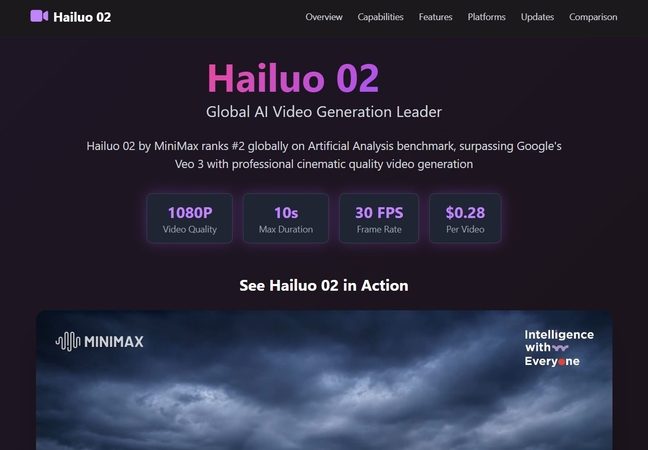
Hailuo 02 and Hailuo 2.3 both generate clips at native 1080p resolution and 10 seconds maximum duration, at 30 frames per second.
Hailuo Video Agent: One-Click End-to-End Creation
Beyond the base generation models, MiniMax recently launched Hailuo Video Agent in beta—an AI-powered video creation tool that generates complete, polished videos from simple text or image input with a single click. The agent is designed to handle end-to-end workflows: from ideation to asset sourcing, storyboarding, editing, and voiceover, all orchestrated by a large language model (LLM). Future stages will add semi‑customizable and fully autonomous video generation options.
Key Features
1. Industry-Leading Human Performance and Physics
What truly distinguishes Hailuo AI from competitors is its mastery of physics simulation and human movement. In independent side-by-side testing, Hailuo 2.3 consistently ranks best for humans and micro-expressions—body movement, subtle gestures, and emotionally readable moments come through clearly, without the mechanical “AI stiffness” that plagues many rival models.
The engine simulates how materials actually behave: water surface tension, how silk moves differently from cotton, hair reacting to wind with proper inertia. When you prompt Hailuo for complex physics, it delivers with unusually high fidelity. For example, inputting:
“Rainy night, a man in his forties standing on a skyscraper rooftop, wind blowing his coat hem, raindrops dripping from his chin”
—the model accurately generates the coat flapping in the wind and raindrops sliding down the man’s face, matching real-world physics. Free AI Tools
2. Exceptional Prompt Adherence and Complex Instruction Following
Hailuo demonstrates strong command-following capabilities, even for elaborate, multi‑stage prompts. In testing, the model successfully executed complex camera choreography, transitioning from a crowd in a plaza down to a sniper scope and crosshair close‑up—or shifting seamlessly from a TV screen’s wanted poster to a man disappearing into a crowd.
3. Director Mode for Natural Language Camera Control
A standout feature across the Hailuo 01 Director and Hailuo 02 models is director-style camera control via natural language. Instead of struggling with abstract parameters, you can simply type commands like:
[Pan left][Zoom in slowly][Push in toward the character]
The model interprets these commands and applies appropriate camera movements accordingly
4. Stylization Strengths: Anime, Illustration, and Game CG
Where Hailuo 2.3 really shines is in stylized content—specifically anime, illustration, ink wash painting, and game computer graphics (CG). Most competing models trained primarily on photorealistic footage tend to generate “semi‑realistic with anime‑adjacent aesthetics” that never fully commit to either style. Hailuo 2.3 avoids this compromise by fully embracing animation conventions: character proportions, color grading, motion arcs, and held poses all align with professional animation standards, making the output genuinely useful for production work.
5. Subject Reference for Character Consistency
Hailuo 01 Subject (S2V-01) allows users to upload a single reference image to maintain a character’s identity across multiple generations—an essential feature for series, brand mascots, and avatar-based content.
6. Hailuo Video Agent (Beta)
The newly released Video Agent represents MiniMax’s vision for end-to-end, zero‑touch video creation. Users simply input a brief text description or upload an image, and the agent autonomously:
- Brainstorms the concept
- Sources assets
- Creates a storyboard
- Generates the video
- Adds voiceover
All without manual editing. The agent currently operates in Stage One (prebuilt templates for high‑quality creative videos), with Stage Two (semi-customizable workflows) and Stage Three (fully autonomous generation) planned for future releases.
Pricing Plans (May 2026)
Hailuo AI operates on a freemium model with a generous free tier—perfect for testing the tool before committing to a paid subscription. For those who want a broader overview of budget-friendly options, be sure to browse our Free AI Tools collection.
Additional pricing notes:
- Individual videos cost 15–80 credits depending on model, resolution, and duration.
- Credit packs are also available as one-time purchases (1‑year expiry).
- API pricing via platforms like Atlas Cloud runs approximately **0.08persecond∗∗(roughly0.80 for a 10‑second clip).
- Through fal.ai, Hailuo 2.3 Pro (1080p full quality) costs about $0.49 per 6‑second video.
Pricing comparison (cost per 10-second 1080p video):
For creators who need to produce large volumes of video without breaking the bank, Hailuo AI delivers outstanding value. For a deeper comparison of other cost‑effective AI video generators, see our Runway Gen‑4.5 Review.

Use Cases: Who Should Use Hailuo AI?
1. Character-Driven Content Creators
If your work involves talking avatars, character animations, or any content where human expression matters, Hailuo is arguably the best choice at its price point. The model handles facial expressions, hand gestures, and subtle body language with remarkable naturalness—better than most competitors for avatar-based and character-driven videos.
2. E‑Commerce and Product Demonstrations
Creators producing product showcase videos benefit from Hailuo’s physics realism. The model accurately simulates:
- Liquids pouring realistically
- Fabric draping and rippling
- Rim lighting and reflective surfaces
In side-by-side testing, Hailuo 2.3 consistently maintained consistent bottle positioning, predictable liquid arcs, and accurate lighting when prompted.
3. Anime and Illustration Studios
For teams working in stylized animation—anime, manga, game CG, ink wash painting—Hailuo 2.3 is unmatched among general‑purpose video models. It fully commits to animation conventions: character proportions, color grading, motion arcs, and frame pacing that follow animation principles rather than photorealism.
4. Rapid Prototyping and Social Media Content
Hailuo’s generous free tier (2–3 videos daily, no credit card required) makes it perfect for creators who need to:
- Test multiple concepts quickly
- Produce short‑form social content
- Iterate on ideas before committing to higher‑cost tools
Generation speeds are notably fast—Hailuo produces clips faster than many competitors, with minimal queueing.
5. Independent Filmmakers and Storytellers
Hailuo’s director mode (natural language camera control) and multi‑shot support make it a practical tool for storyboarding, pre‑visualization, and even final shot generation in low‑budget productions.
Hailuo AI vs. Competitors (2026)
The AI video market has effectively consolidated to three leading players with the shutdown of OpenAI’s Sora consumer app. Here’s how Hailuo stacks up against the top contenders:
| Aspect | Hailuo 2.3 | Kling 3.0 | Runway Gen-4.5 |
|---|---|---|---|
| Best for | Character realism, physics, budget value | Cinematic motion, long clips | Creative control, editing tools |
| Max duration | 10 seconds | 10 sec (3 min extendable) | 10 seconds |
| Max resolution | 1080p | 4K | 4K (upscaled) |
| Native audio | ❌ No | ✅ Yes (doubles credits) | ✅ Yes |
| Prompt adherence (complex) | 72% | 68% | 72% |
| Price per sec (1080p) | ~$0.08 (API) | ~$0.14 | ~$0.20 |
| Physics realism | Excellent (liquids, cloth, hair) | Good (better for motion) | Very good |
| Human performance | Best in class | Good | Very good |
| Stylized content (anime, CG) | Exceptional | Moderate | Moderate |
| Free tier | Daily credits (~2-3 videos) | Limited | 125 one‑time credits |
Head‑to‑Head: The Practical Differences
Hailuo vs. Kling: Hailuo’s physics hold up better—water surface tension, how silk moves differently from cotton, hair reacting to wind with proper inertia—while Kling prioritizes cinematic motion, tracking shots, multi‑shot storyboards across up to six consecutive scenes, and native 9:16 vertical output. Neither covers the other’s ground perfectly.
Hailuo vs. Runway: Runway offers 45‑second clips and professional‑grade editing tools (Motion Brush, Act‑Two, multi‑shot storyboards) at roughly $0.20 per second. Hailuo is roughly 4× cheaper per video but caps at 10 seconds. Hailuo also surpasses Runway in physics simulation, character motion realism, and stylized content.
Hailuo vs. Google Veo 3.1: Google Veo 3.1 leads in photorealistic cinematic output, 4K resolution, and native audio sync. Hailuo is more cost‑effective (0.08 vs 0.40 per second) and stronger for character animation and stylized content.
Hailuo vs. Pika Labs: Hailuo offers 5× the maximum duration (30 seconds vs. 6 seconds) at comparable speed and pricing, making it the direct alternative for budget‑conscious teams that need slightly longer clips.
For a more detailed breakdown of these alternatives, you can also read our Kling AI 3.0 Review and Pika Labs Review.
How to Get Started with Hailuo AI (Step‑by‑Step)
Access Options
Option 1: Web App (easiest for beginners)
- Visit the official Hailuo AI website (
hailuoai.video). - Sign up for a free account—no credit card required.
- Claim your daily free credits (roughly 2–3 videos/day).
- Choose between Text‑to‑Video or Image‑to‑Video.
- Write your prompt or upload an image, then click generate.
Option 2: Mobile App (iOS / Android)
Hailuo AI is also available as a dedicated mobile app, with in‑app purchases ranging from approximately 6–100.
Option 3: API (for developers)
Access Hailuo 2.3 through API platforms like:
- Atlas Cloud (~$0.08/sec, USD1 free credit on sign‑up)
- fal.ai ($0.49 for 6‑second Pro video)
- OpenRouter (~$0.0817/sec)
The API supports both text‑to‑video and image‑to‑video workflows.
Practical Tips for Better Results
From community testing and user feedback, these prompt strategies consistently yield better outputs:
- Use camera movement commands — Hailuo Director mode responds well to natural language camera controls (e.g., “[Pan left slowly]”)
- Start with image‑to‑video — For character consistency, upload a reference image first
- Keep prompts detailed but focused — Hailuo’s prompt adherence is strong, but overly complex scenes can confuse the model
- Enable “high‑detail” settings — For final renders, toggle the high‑detail option in the web app
- Use Subject Reference for character‑driven series — Upload a single reference image to lock in character identity across multiple generations
Limitations and Honest Criticisms
No tool is perfect. Here are Hailuo’s most significant drawbacks:
1. No Native Audio Generation
Hailuo 2.3 does not generate native synchronized audio. Unlike Google Veo 3.1 (which generates audio in the same pass) and Kling 3.0 (which offers native audio at double credit cost), Hailuo produces silent video. You’ll need to add audio separately using external tools.
2. 10‑Second Duration Limit
While Hailuo exceeds the 6‑second cap of Pika Labs, its 10‑second maximum duration is still too short for:
- Longer product demonstrations
- Narrative scenes requiring sustained action
- E‑learning modules
- Any content requiring extended storytelling
3. Limited Camera Movement Capability
Hailuo’s physics and character animation shine, but its camera movement capabilities lag behind Runway and Kling. When prompted for complex camera work (e.g., “slow camera pull toward bottle”), the motion can appear glitchy or unnatural.
4. No 4K Output
Maximum resolution is 1080p. Premium 4K output is not yet available, though MiniMax’s roadmap includes 4K generation in future iterations.
5. Narrow Aspect Ratio Support (Currently 16:9 Only)
Hailuo currently only supports 16:9 (landscape) aspect ratios. This means no native 9:16 vertical output for TikTok and Reels—creators need to crop or post‑process vertically.
6. No Commercial Use on Free Tier
Free‑tier videos include watermarks and are not licensed for commercial use. You must upgrade to at least the Standard plan ($9.99/month) for commercial licensing.
7. Occasional Inconsistency with Multi‑Character Prompts
While Hailuo handles single‑character physics exceptionally well, complex multi‑character interactions can sometimes produce inconsistent results or glitches.
For more information on troubleshooting common issues with AI video tools, check out our Contact Us page—we’re happy to help.
The Future of Hailuo AI (MiniMax’s Roadmap)
MiniMax has outlined an aggressive roadmap for Hailuo:
- 4K video generation — Planned for future releases
- Hierarchical editing — For finer control over video layers
- Long‑video consistency optimization — For maintaining character and scene coherence across extended sequences
- Hailuo Video Agent Stage Two — Semi‑customizable workflows (coming summer 2026)
- Hailuo Video Agent Stage Three — Fully autonomous, end‑to‑end video generation
Given MiniMax’s substantial funding ($1B+) and deep research focus—the company’s M2.7 language model ranks among the top open‑source models for coding and agentic tasks—Hailuo is well‑positioned to continue improving rapidly.
Final Verdict: Is Hailuo AI Worth It?
Yes—emphatically for creators who need realistic character animation, physics‑driven motion, and strong value for money. Hailuo AI is not the most polished cinematic tool nor the one with the longest clips or highest resolution. But it is arguably the best in its class for human performance, character consistency, and material physics—all at a fraction of the cost of premium competitors.
Choose Hailuo AI if:
- Your work involves talking characters, avatars, or any content where human expression matters
- You need realistic physics (liquids, cloth, hair, reflective surfaces)
- You’re producing stylized content (anime, illustration, game CG)
- You value cost‑effectiveness (Hailuo costs roughly 4× less than Runway and 10× less than Sora)
- You want a generous free tier to test before committing
- You produce short‑form content (under 10 seconds per clip)
Consider alternative tools if:
- You need long‑form narrative videos (over 10 seconds) → Try Kling 3.0 (3‑minute clips)
- You need native 4K output → Consider Kling 3.0 or Runway Gen‑4.5
- You need native synchronized audio → Try Google Veo 3.1 or Kling 3.0 (audio adds cost)
- You need vertical (9:16) output → Currently, Hailuo only supports 16:9
- You need extensive creative editing tools (layering, keyframes) → Runway Gen‑4.5 is the leader
- You produce high‑volume commercial output at the lowest possible cost per frame → Runway Gen‑4 Turbo remains strong
FAQ (Frequently Asked Questions)
Q: Is Hailuo AI free?
A: Yes, Hailuo AI has a free tier with daily login credits providing roughly 2–3 videos per day at 720p/768p resolution. Outputs are watermarked and not for commercial use.
Q: How does Hailuo AI compare to Kling AI 3.0?
A: Hailuo excels at physics realism and human expression. Kling 3.0 excels at cinematic motion, camera control, and long‑form clips. They’re complementary tools rather than direct replacements—use Hailuo for characters and physics, Kling for motion and storytelling. For a deeper comparison, read our Kling AI 3.0 Review.
Q: Can I use Hailuo AI for commercial projects?
A: Yes, but only with a paid subscription (Standard plan or higher). Free‑tier videos include watermarks and are not licensed for commercial use.
Q: Does Hailuo AI have an API?
A: Yes. Hailuo 2.3 is accessible via API through platforms like Atlas Cloud (~0.08/sec),fal.ai( 0.49 per 6‑second Pro video), and OpenRouter. The API supports both text‑to‑video and image‑to‑video workflows.
Q: What’s the maximum video length?
A: 10 seconds per generation for Hailuo 02 and 2.3 models (Hailuo 01 supports shorter lengths). The Hailuo Video Agent can generate longer sequences by stitching multiple clips together.
Q: Does Hailuo AI support image‑to‑video?
A: Yes, strong image‑to‑video support is a core feature. You can upload a static image, and Hailuo animates it with natural camera movement and physics.
Q: How do I remove the watermark?
A: Upgrade to a paid subscription (Standard, Pro, Master, Ultra, or Max). Paid plans remove watermarks and enable commercial usage.
Q: Does Hailuo generate audio?
A: No—Hailuo models currently do not generate native synchronized audio. All outputs are silent video. You’ll need to add audio using a separate tool.
Q: How long does generation take?
A: Generation speeds are notably fast. Hailuo generally produces clips faster than most competitors, with minimal queueing—typically 5–15 seconds for generation.
Conclusion
Hailuo AI is a specialist tool in a market dominated by generalists. Its physics engine produces some of the most convincing character animation and material behavior available at any price point, let alone at Hailuo’s budget‑friendly rates.
Yes, Runway and Kling will produce more cinematic results for some use cases. Yes, Google Veo 3.1’s native 4K and audio sync are objectively more advanced. But for creators who value natural human expression, realistic physics, and exceptional cost‑effectiveness, Hailuo AI is arguably the best choice in 2026.
If you’re just starting out, the free tier lets you test the tool with zero financial commitment. If you’re producing commercial work at scale, the Standard (9.99/month)orPro(34.99/month) plans deliver outstanding value. And if you’re a developer building video applications, the API‑based access (starting at ~$0.08/second) provides a predictable, pay‑as‑you‑go cost structure.
For a broader overview of all the top AI video generators, don’t forget to browse our AI Tools Directory and subscribe to our Blog for regular updates on the latest tools and feature releases.
Last updated: May 2026